Bot protection example: humans and AI bots
Learn how a small Express app gives people, bots that say what they are, and bots that hide or disguise themselves different access to the same content with Permit.io. The app classifies each request, sends the result to Permit as the botType attribute of the user, and attribute-based access control (ABAC) rules decide what that kind of caller may do with each item. This page is for developers who want to handle automated traffic, AI crawlers and agents included, as a kind of user in their authorization policy instead of only blocking it at the edge.
The code is in the fine-grained-bot-protection folder of the permitio/examples repository. The app runs on your machine with Docker Compose and needs only a Permit environment API key. All paths on this page are relative to the fine-grained-bot-protection folder.
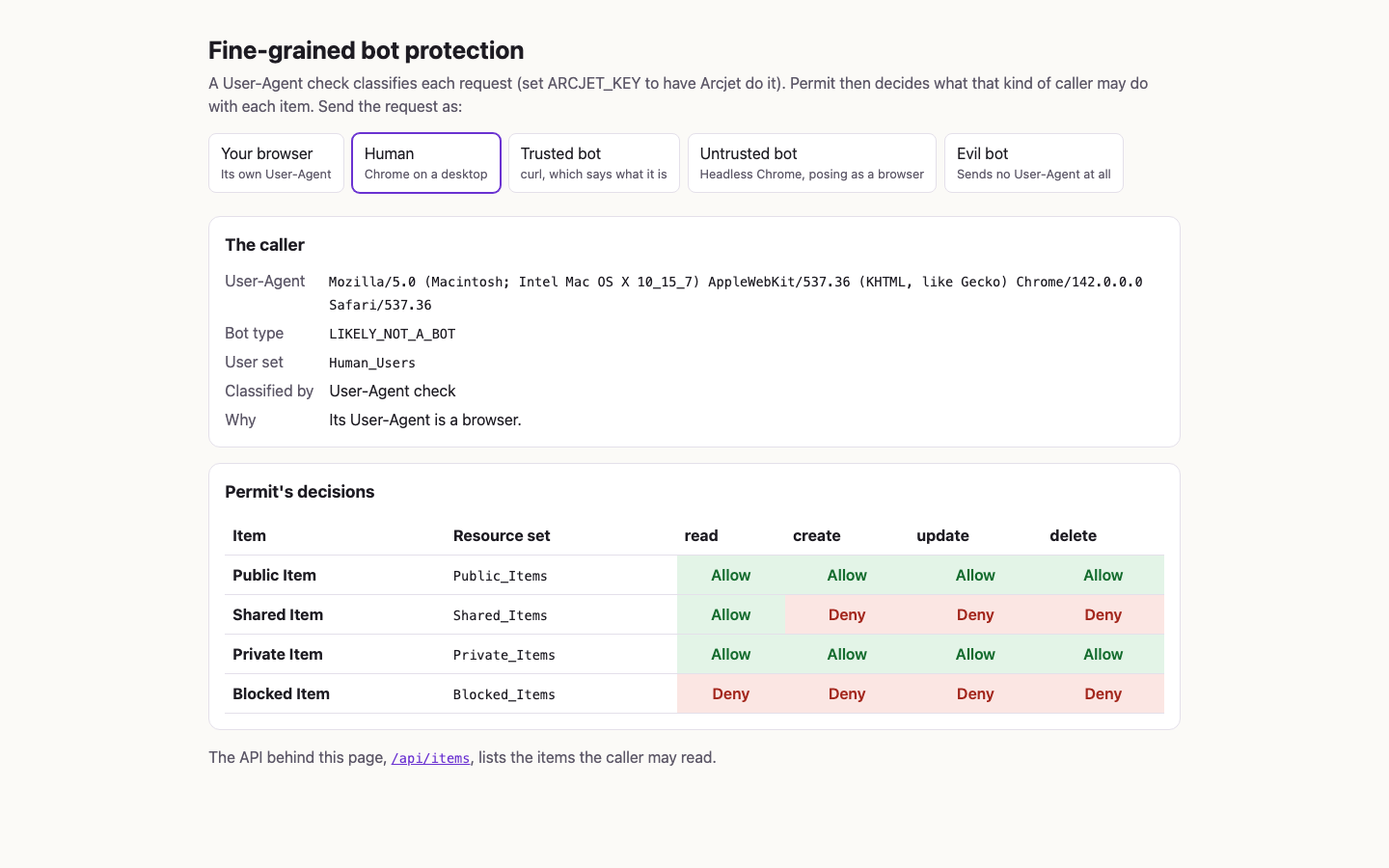
The demo page at http://localhost:3000 shows Permit's decision for every item and action, and buttons at the top send the request as each kind of caller. In the following screenshot, the request goes as a human using Chrome on a desktop. Permit allows every action on the user's own items, only read on the item another user shares, and nothing on the other user's private item:
What the example shows
Every request acts as the same signed-in user, user@example.com, so the only thing that changes Permit's answer is what kind of caller sent the request. The demo has four callers, one for each user set in the policy:
| Caller | User-Agent it sends | botType | User set | Description of the user set |
|---|---|---|---|---|
| Human | Chrome on a desktop | LIKELY_NOT_A_BOT | Human_Users | Known humans and verified bots |
| Trusted bot | curl/8.11.1 | AUTOMATED | Trusted_Bots | Bots that do not hide what they are |
| Untrusted bot | Headless Chrome | LIKELY_AUTOMATED | Untrusted_Bots | Bots that pretend to be human |
| Evil bot | None | NOT_ANALYZED | Evil_Bots | Bots that hide what they are |
A crawler or an AI agent that names itself in its User-Agent, such as Googlebot or GPTBot, is a trusted bot. With an Arcjet key, a bot whose identity Arcjet verifies is VERIFIED_BOT instead, and gets a human's access through Human_Users. The botType values are the names of Arcjet's earlier bot ranks. How a request is classified explains where each value comes from.
The buttons replace the browser's own User-Agent with the caller's, because a browser can't change its own. The page's ?as= parameter that does this exists only for the demo: the API, /api/items, classifies each request as it arrives.
Application architecture
Docker Compose runs three services:
| Service | Role in the example |
|---|---|
app | An Express app with the demo page on / and the API on /api/items, on http://localhost:3000. It classifies each request, then asks the PDP in one bulk check. |
pdp | The policy decision point (PDP), permitio/pdp-v2, connected to your Permit environment, on http://localhost:7766. It answers the app's checks. |
setup | A one-shot service that writes the policy and the demo user to your Permit environment through the Permit API, waits until the PDP answers every check as GRANTS says, then exits. The app starts once setup has finished. |
The classifier runs inside the app. With an ARCJET_KEY, it is the Arcjet SDK, which asks Arcjet's API about each request. Without one, it is a User-Agent check in the app's own code. The following diagram shows which part calls which:
Each request to /api/items goes through the same steps:
The authorization model
src/policy.ts holds the policy as data. src/write-policy.ts turns it into Permit API calls with the Node.js SDK, and src/setup.ts runs it. Setup creates what is missing and updates what exists, so it is safe to run again. The model has no roles: user sets and resource sets decide everything.
The resource
| Resource | Actions | Attributes |
|---|---|---|
Content_Item | read, create, update, delete | owner (string): the key of the user who owns the item. private (bool): whether only the owner may see the item. |
The app doesn't sync its items to Permit as resource instances. It sends each item's owner and private attributes with the check. The demo has four items, in src/items.ts:
| Item | owner | private | Resource set it falls in |
|---|---|---|---|
| Public Item | user@example.com, the caller | false | Public_Items |
| Shared Item | other-user@example.com | false | Shared_Items |
| Private Item | user@example.com, the caller | true | Private_Items |
| Blocked Item | other-user@example.com | true | Blocked_Items |
The botType attribute and the user sets
A user set is a condition set based on user attributes. Setup creates one user attribute, botType (string), on Permit's built-in __user resource, and four user sets on it:
| User set | Matches botType |
|---|---|
Human_Users | LIKELY_NOT_A_BOT or VERIFIED_BOT |
Trusted_Bots | AUTOMATED |
Untrusted_Bots | LIKELY_AUTOMATED |
Evil_Bots | NOT_ANALYZED |
Permit doesn't store a botType value for the user. The app sends botType with every check, so the same user falls in a different user set on each request. The Human_Users entry in src/policy.ts:
{
  key: 'Human_Users',
  name: 'Human Users',
  description: 'Known humans and verified bots',
  botTypes: ['LIKELY_NOT_A_BOT', 'VERIFIED_BOT'],
},
userSetPayload() in src/write-policy.ts turns each entry into a user set that matches any of its bot types:
export function userSetPayload(set: (typeof USER_SETS)[number]): SetPayload {
  const matches = set.botTypes.map((botType) => ({ 'user.botType': { equals: botType } }));
  return {
    key: set.key,
    name: set.name,
    description: set.description,
    type: 'userset',
    conditions: { allOf: [{ anyOf: matches }] },
  };
}
The resource sets
A resource set is a condition set based on resource attributes. A resource set condition can compare a resource attribute with a user attribute, which this policy uses to tell the caller's items from another user's:
| Resource set | Condition |
|---|---|
Public_Items | resource.owner equals user.key, and resource.private is false |
Shared_Items | resource.owner doesn't equal user.key, and resource.private is false |
Private_Items | resource.owner equals user.key, and resource.private is true |
Blocked_Items | resource.owner doesn't equal user.key, and resource.private is true |
resourceSetPayload() in src/write-policy.ts builds each condition from the set's owner (caller or other) and private fields:
export function resourceSetPayload(set: (typeof RESOURCE_SETS)[number]): SetPayload {
  const owner = set.owner === 'caller' ? 'equals' : 'not-equals';
  return {
    key: set.key,
    name: set.name,
    description: set.name,
    type: 'resourceset',
    resource_id: RESOURCE_KEY,
    conditions: {
      allOf: [
        {
          allOf: [
            { 'resource.owner': { [owner]: { ref: 'user.key' } } },
            { 'resource.private': { equals: set.private } },
          ],
        },
      ],
    },
  };
}
Setup also syncs the demo user, user@example.com, with permit.api.users.sync(). The conditions compare an item's owner with the user's key attribute, which the PDP has only for users that Permit knows. For the same ownership pattern in the Permit dashboard, see Model ownership.
The policy grid
Condition set rules grant each user set actions on each resource set. A pair without a rule grants nothing:
| User set | Public_Items | Shared_Items | Private_Items | Blocked_Items |
|---|---|---|---|---|
Human_Users | read, create, update, delete | read | read, create, update, delete | None |
Trusted_Bots | read | read | read | None |
Untrusted_Bots | read | read | None | None |
Evil_Bots | None | None | None | None |
No one may touch a blocked item, and an evil bot may do nothing. Only a human may create, update, or delete, and only on the caller's own items. The following diagram shows the same grid: each user set with the botType values it matches, and the actions it may take on each resource set:
The grid is GRANTS in src/policy.ts. grantRules() in src/write-policy.ts turns each listed action into one rule of user set, Content_Item:<action> permission, and resource set:
export const GRANTS: Record<UserSetKey, Partial<Record<ResourceSetKey, readonly Action[]>>> = {
  Human_Users: {
    Public_Items: ACTIONS,
    Shared_Items: ['read'],
    Private_Items: ACTIONS,
  },
  Trusted_Bots: {
    Public_Items: ['read'],
    Shared_Items: ['read'],
    Private_Items: ['read'],
  },
  Untrusted_Bots: {
    Public_Items: ['read'],
    Shared_Items: ['read'],
  },
  Evil_Bots: {},
};
GRANTSSetup creates each rule in GRANTS that the environment doesn't have yet, and deletes the rules between this policy's user sets and resource sets that GRANTS no longer lists. Rules that involve any other set stay. To try a stricter grid, edit GRANTS and run setup again.
How a request is classified
The app picks a classifier when it starts, in src/choose-classifier.ts, and logs which one it runs:
Bot classifier: Arcjet (ARCJET_KEY is set)
Bot classifier: User-Agent check (ARCJET_KEY is not set)
Without an Arcjet key: the User-Agent check
classifyUserAgent() in src/user-agent-classifier.ts reads only the User-Agent header. The first rule that matches decides:
- No User-Agent, or an empty one:
NOT_ANALYZED. - A script-driven browser (
HeadlessChrome,PhantomJS,Cypress):LIKELY_AUTOMATED. - A bot, crawler, or HTTP tool that names itself (
bot,crawl,spider,curl/,python-, and others):AUTOMATED. - A browser (
Mozilla/5.0 ():LIKELY_NOT_A_BOT. - Anything else:
AUTOMATED.
The User-Agent check never reports VERIFIED_BOT: telling a real Googlebot from a copy takes the caller's network address, which Arcjet checks.
Any client can send any User-Agent. Without an Arcjet key, a bot that sends a desktop browser's User-Agent is classified as a human and gets a human's access. The User-Agent check shows how the policy works. To protect real content, classify requests on more than a header: the Arcjet classifier also uses the caller's network address.
With an Arcjet key
createArcjetClassifier() in src/arcjet-classifier.ts runs Arcjet's bot detection in DRY_RUN mode, so it only reports what it finds and Permit decides, and Arcjet Shield in LIVE mode. Arcjet's current SDK doesn't report the old bot ranks, so classifyDecision() maps its findings onto them. The first match decides:
- Shield detects an attack: the app answers HTTP 403 and doesn't ask Permit.
- No User-Agent, a spoofed bot (one that claims to be Googlebot from another network, for example), or a known botnet:
NOT_ANALYZED. - A bot whose identity Arcjet verified:
VERIFIED_BOT, which is inHuman_Users. - A script-driven browser, or a browser User-Agent from a hosting provider's network:
LIKELY_AUTOMATED. - Any other bot Arcjet identified, such as curl, a crawler, or an AI agent:
AUTOMATED. - No sign of a bot:
LIKELY_NOT_A_BOT.
When Arcjet can't decide, for example because the key is wrong or its API is unreachable, the User-Agent check decides that request, and the reason on the page and in the API response says so.
Walk through the callers
The results in this section come from a run without an Arcjet key, so the User-Agent check classifies each request. The page's decision table and the API agree with the policy grid for every caller.
A human
Open http://localhost:3000/?as=human, or click Human. The request carries a desktop Chrome User-Agent, so the caller is LIKELY_NOT_A_BOT in Human_Users. Permit allows all four actions on Public Item and Private Item, which the caller owns, and only read on Shared Item. Everything on Blocked Item is denied, because no rule grants anything on Blocked_Items. The screenshot at the top of this page shows this table.
A trusted bot
Click Trusted bot, or call the API with curl, which sends its own User-Agent:
curl http://localhost:3000/api/items
The caller is AUTOMATED in Trusted_Bots. Permit allows read on Public Item, Shared Item, and Private Item, and denies create, update, and delete on every item. The API lists those three items. A request whose User-Agent names GPTBot gets the same classification and the same three items.
An untrusted bot
Click Untrusted bot. The request carries a Headless Chrome User-Agent, so the caller is LIKELY_AUTOMATED in Untrusted_Bots. Permit allows read on Public Item and Shared Item only. Unlike for a trusted bot, Private Item is denied, although the same user owns it:
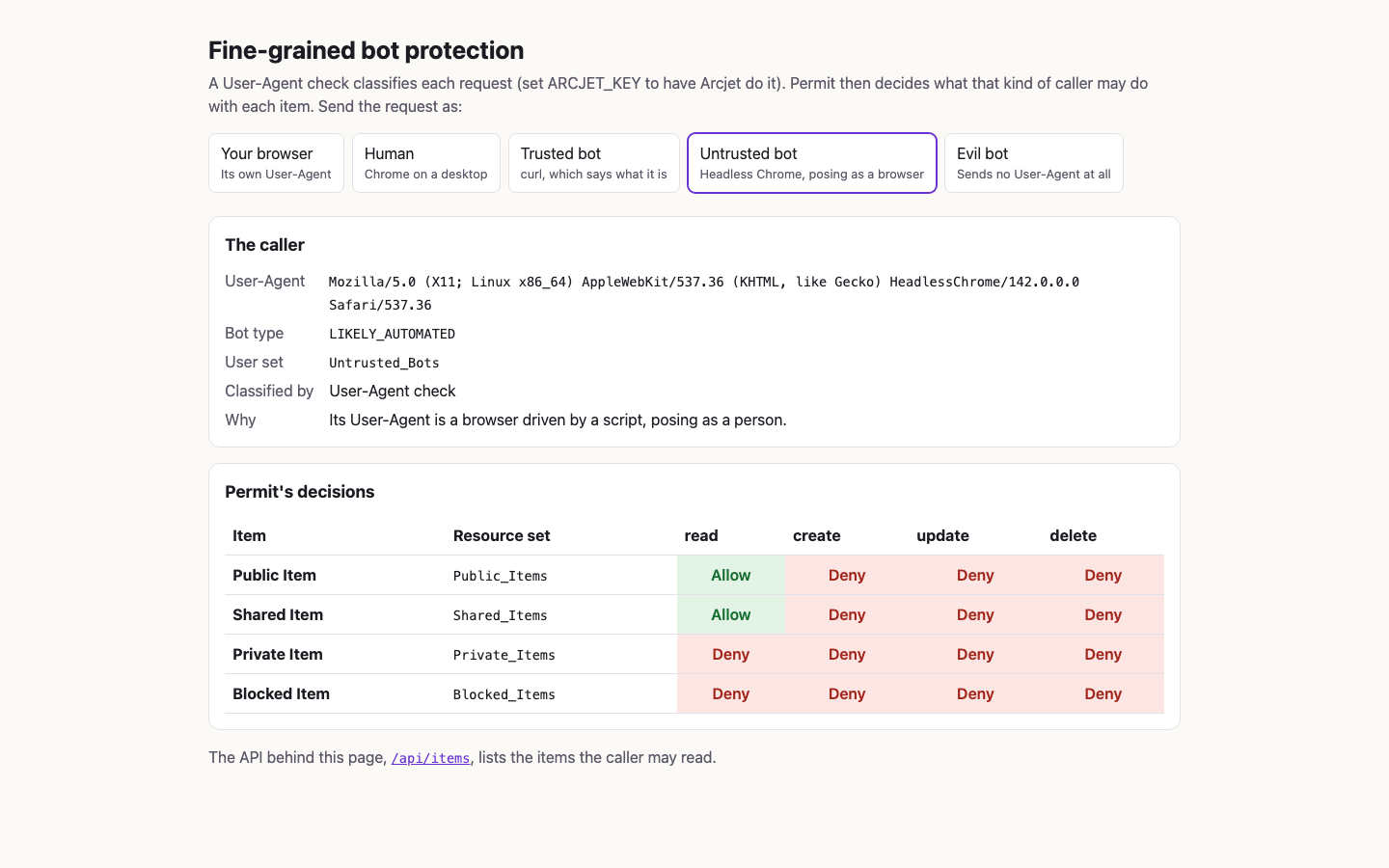
The API gives the same answer. This response is piped through jq for readability:
curl -s -A 'HeadlessChrome/142.0.0.0' http://localhost:3000/api/items | jq .
{
  "caller": {
    "userAgent": "HeadlessChrome/142.0.0.0",
    "classifiedBy": "user-agent",
    "reason": "Its User-Agent is a browser driven by a script, posing as a person.",
    "botType": "LIKELY_AUTOMATED",
    "userSet": "Untrusted_Bots"
  },
  "items": [
    {
      "id": 1,
      "name": "Public Item",
      "owner": "user@example.com",
      "private": false
    },
    {
      "id": 2,
      "name": "Shared Item",
      "owner": "other-user@example.com",
      "private": false
    }
  ]
}
A headless browser that opens the page with Your browser sends its own Headless Chrome User-Agent, and is classified the same way.
An evil bot
Click Evil bot, or send a request without a User-Agent. The caller is NOT_ANALYZED in Evil_Bots, which has no grants, so Permit denies every action on every item:
curl -s -H 'User-Agent:' http://localhost:3000/api/items | jq .
{
  "caller": {
    "userAgent": null,
    "classifiedBy": "user-agent",
    "reason": "It sent no User-Agent, hiding what it is.",
    "botType": "NOT_ANALYZED",
    "userSet": "Evil_Bots"
  },
  "items": []
}
The API answers HTTP 200 with an empty list, not an error. Each item is filtered out by the read check.
How the app enforces the policy
The app asks Permit in one place. Every line that calls Permit carries a // Permit check:, // Permit read:, or // Permit write: comment, so git grep -n "// Permit \(check\|read\|write\):" src lists them all.
| Path | Contents |
|---|---|
src/policy.ts | The policy as data: the resource, the botType attribute, the user sets, the resource sets, and GRANTS |
src/write-policy.ts, src/setup.ts | The setup that writes the policy and the demo user with the Node.js SDK |
src/wait-for-pdp.ts | The setup step that sends every check the app can send until the PDP's answers match GRANTS |
src/items.ts, src/personas.ts | The demo user, the four items, and the User-Agent of each caller on the demo page |
src/user-agent-classifier.ts, src/arcjet-classifier.ts | The two classifiers |
src/authorize.ts | decide(), the one bulk check the app sends per request |
src/app.ts | The /api/items route and the demo page |
One bulk check per request
decide() in src/authorize.ts sends a check for each item and action in one permit.bulkCheck() call. Each check carries the demo user's key with the botType the classifier reported, and the item's owner and private attributes. The resource has a type and attributes, and no instance key:
const pairs = ITEMS.flatMap((item) => ACTIONS.map((action) => ({ item, action })));
let answers: boolean[];
try {
  // Permit check: one bulk call, a check per item and action.
  answers = await permit.bulkCheck(
    pairs.map(({ item, action }) => ({
      user: { key: USER_KEY, attributes: { botType } },
      action,
      resource: {
        type: RESOURCE_KEY,
        attributes: { owner: item.owner, private: item.private },
      },
    })),
  );
} catch (err) {
  throw new PdpError(err);
}
The PDP returns one boolean per check, in order. When the PDP doesn't answer, or returns fewer answers than checks, decide() throws a PdpError, and the app answers HTTP 502. See Check many permissions with bulk check.
Filter the items by the read check
The /api/items route in src/app.ts classifies the request, stops a request that Arcjet Shield blocked, and returns only the items whose read check Permit allowed:
app.get('/api/items', async (req, res) => {
  const classification = await classifier.classify(req);
  const caller = callerJson(userAgentOf(req), classification);
  if (classification.kind === 'blocked') {
    res.status(403).json({ error: classification.reason, caller });
    return;
  }
  const decisions = await decide(permit, classification.botType);
  res.json({ caller, items: decisions.filter((d) => d.allowed.read).map((d) => d.item) });
});
The demo page runs the same classification and the same decide() call, and shows all 16 answers in its table instead of filtering.
Run the example locally
The fine-grained-bot-protection README has the steps. In short, you copy .env.example to .env, set your environment API key (Get your API key) as PERMIT_API_KEY, and run docker compose up --build. Compose starts the PDP, the one-shot setup service that writes the policy and the demo user, and the app on http://localhost:3000. An ARCJET_KEY is optional. The README also describes a dev mode that runs the app with Node 24 outside Docker.
Setup writes the Content_Item resource, the botType user attribute, and the user sets, resource sets, and rules into the environment that PERMIT_API_KEY belongs to, and updates any of them that exist with the same keys.
Verify: Open http://localhost:3000/?as=untrusted-bot. The table allows read on Public Item and Shared Item, and denies every other action.
Next steps
- Build ABAC policies with user sets and resource sets in the Permit dashboard.
- Define attributes as stored values, or send them with each check as this example does with
botType. - Model ownership with an
ownerattribute or a relationship. - Read the fine-grained-bot-protection source to see every check and write in context.