Get AI support
Use Ask AI and Search to find answers in the Permit.io documentation without leaving the page you're on.
Ask AI
Click the Ask AI button at the bottom right of any docs page, or press Ctrl+K (Cmd+K on Mac) and select the Ask AI tab, to open the assistant. Ask AI is powered by Inkeep.
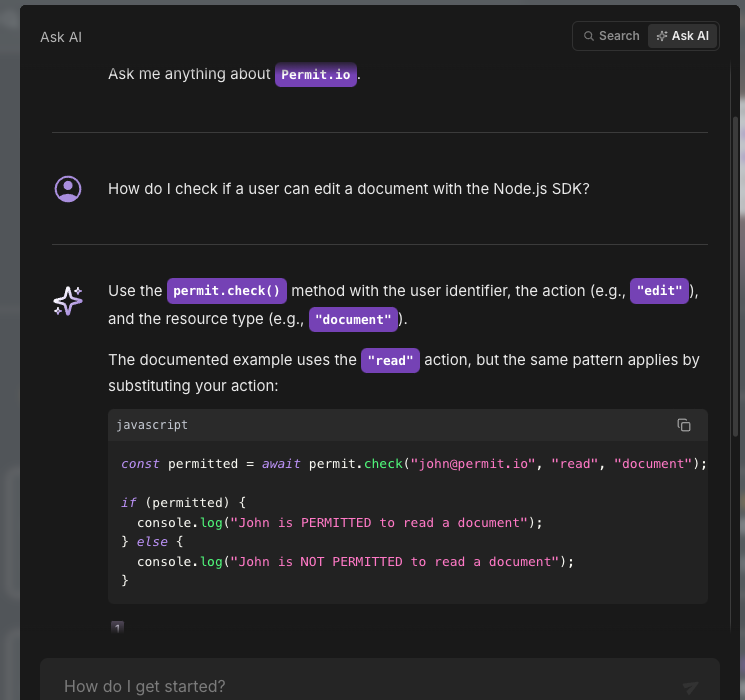
Use Ask AI for "how do I" questions, in your own words. For example: "How do I check if a user can edit a document with the Node.js SDK?"
Ask AI's answers include an explanation, a code sample in the language you asked about, and numbered citations that link back to the documentation page the answer came from.
Search
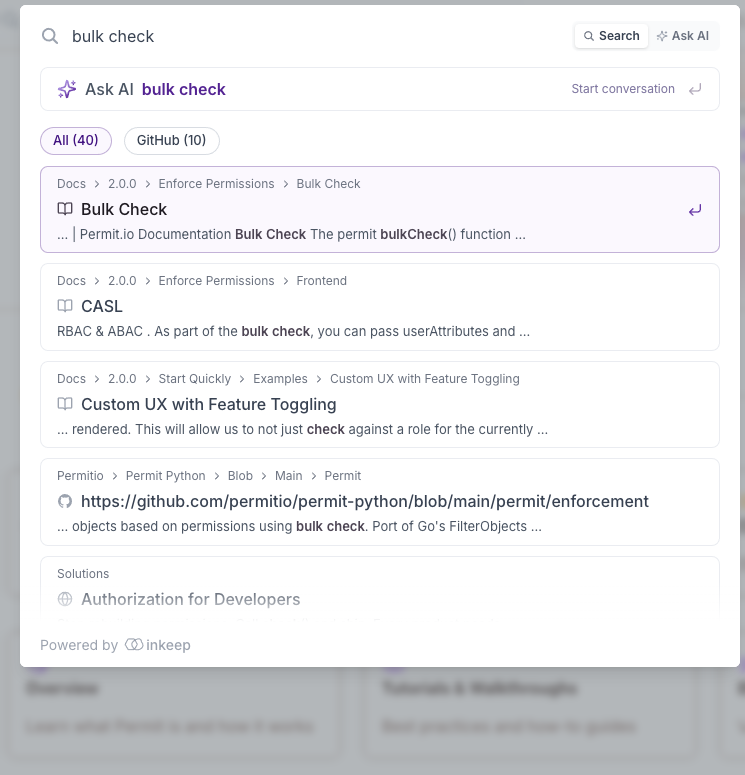
Click Search in the navbar, or press Ctrl+K (Cmd+K on Mac), to open the search box. Search is also powered by Inkeep.
Use Search when you already know what you're looking for, such as a function name or a feature. Search returns a ranked list of matching documentation pages and GitHub results.
Get AI support in Slack
The Permit.io Slack community runs an AI support bot that answers questions in any channel, alongside human support from the Permit team. See Get support on Slack for the channels to post in and the commands to track a ticket.
Tips for good answers
- Name the SDK language you're using, for example Node.js or Python.
- Name the policy model, for example RBAC, ABAC, or ReBAC.
- Include the exact error message or the PDP version when your question is about a failure.
AI answers can be wrong. Verify an answer against the documentation page it cites before you ship code based on it.