Workspace Usage
View how many projects, environments, users, tenants, and monthly active users (MAUs) your Permit.io workspace uses, so you can compare usage against the quotas of your Permit plan. This page is for workspace owners and admins who track usage and billing.
Workspace Level Usage
To view the usage of your workspace:
- In the Permit dashboard sidebar, open the Projects screen.
- Find the workspace usage in the top right corner of the Projects screen.
- To see the usage history of tenants and MAUs in your workspace, click the (?) icon next to the usage.
The workspace usage shows the number of:
- Projects in your workspace
- Environments in your workspace
- Users in your workspace
- Tenants in your workspace
- Monthly active users (MAUs) in your workspace
Environment Level Usage
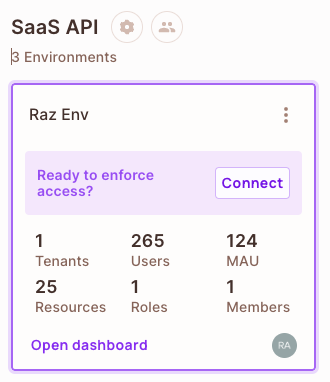
To view the usage of one environment, open the Projects screen in the Permit dashboard sidebar. Each environment card shows the number of:
- Tenants in the environment
- Users in the environment
- Monthly active users (MAUs) in the environment
- Resources in the environment
- Roles in the environment
- Members with access to the environment
MAUs & Tenants Usage
Permit plans set quotas on monthly active users (MAUs) and tenants, among other limits.
| Term | Definition |
|---|---|
| Monthly active users (MAUs) | The unique users of your application that you check permissions for in a month |
| Tenants | Isolated units within an environment, each with its own users, data, and permissions. In a multi-tenant application, a tenant usually represents one of your customers. See Tenants. |
Plan quotas and billing
For the MAU and tenant quotas of each plan and how Permit bills usage, see the Permit.io pricing page.